Alerting app: fast, secure alerting by smartphone
An alerting app replaces phone trees, pagers and manual notifications with one central solution on the smartphone. Instead of calling people one after another and waiting for a reply, a single alarm reaches all relevant recipients at the same time.
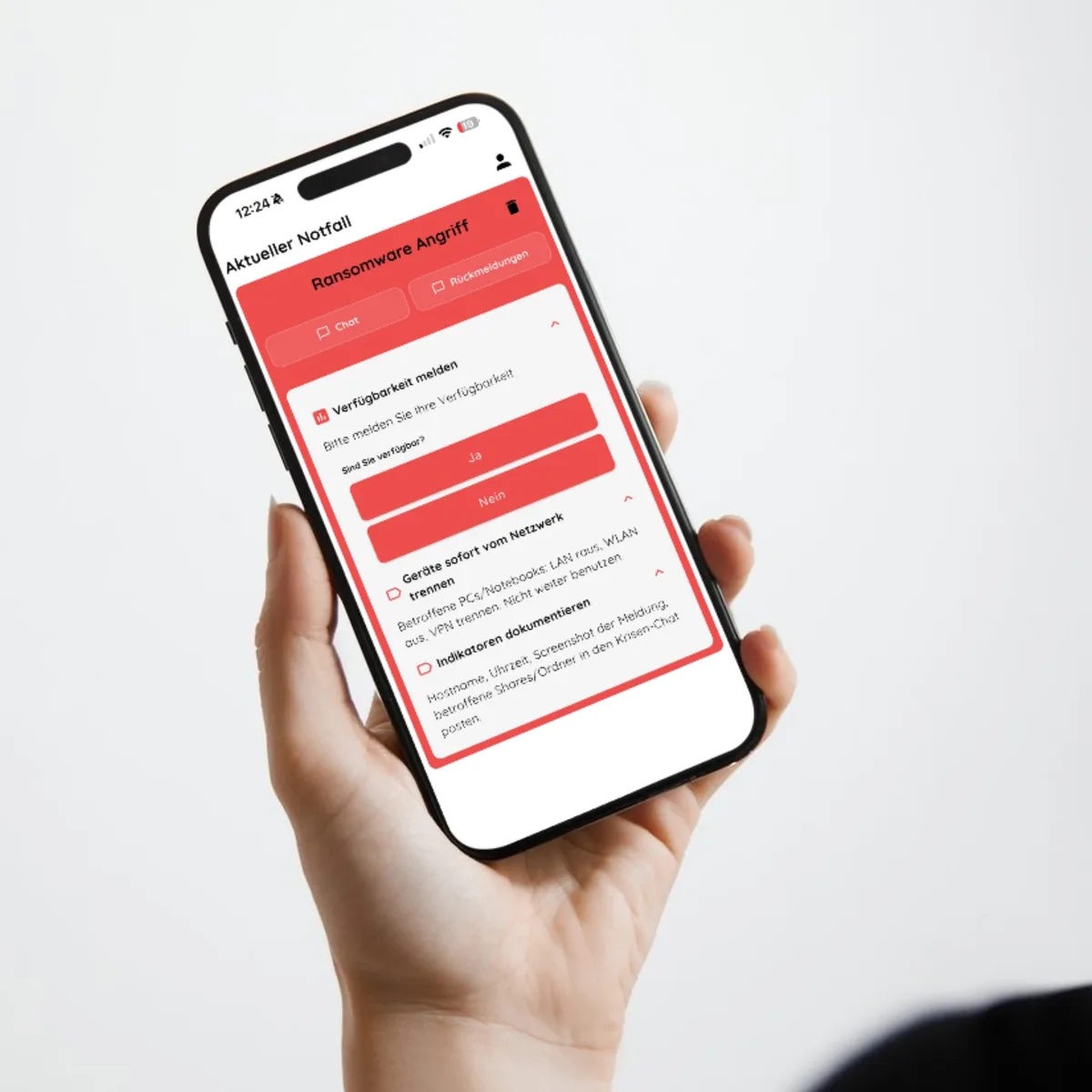
Alerting app — alert in seconds instead of losing minutes
A fire alarm in production at 3 a.m., an IT failure in the data centre, a medical emergency on the factory premises: in each of these situations, seconds decide the outcome. The NICA Alarm App connects smartphone, tablet and desktop into one alerting system. The responses show those in charge straight away who has confirmed the alarm. The focus is on three things: speed of delivery, reliability and ease of use.
Why you need an alerting app
Pagers send signals one way, without a reply. Phone trees break as soon as one person cannot be reached. Emails get overlooked in the inbox. In a study on a surgical intensive care unit (Cedars-Sinai Medical Center, Journal of Surgical Education 2017), doctors responded by smartphone after a median of 0.5 minutes instead of 2 minutes by pager.
Typical problems without an alerting app: nobody knows whether the message has arrived. Information gets lost along the way because it is passed on verbally. The incident lead has no overview of who is available and who is not. An alerting app collects responses centrally and shows the status of all recipients live.
The key benefits at a glance
- Parallel alerting of large groups — All defined people receive the alarm at the same time by push, supplemented by email, SMS or phone call depending on the solution.
- Getting through in silent mode — Alerting apps override the silent mode of smartphones when critical alerts are enabled on the device. The alarm arrives even when the phone is in do-not-disturb mode.
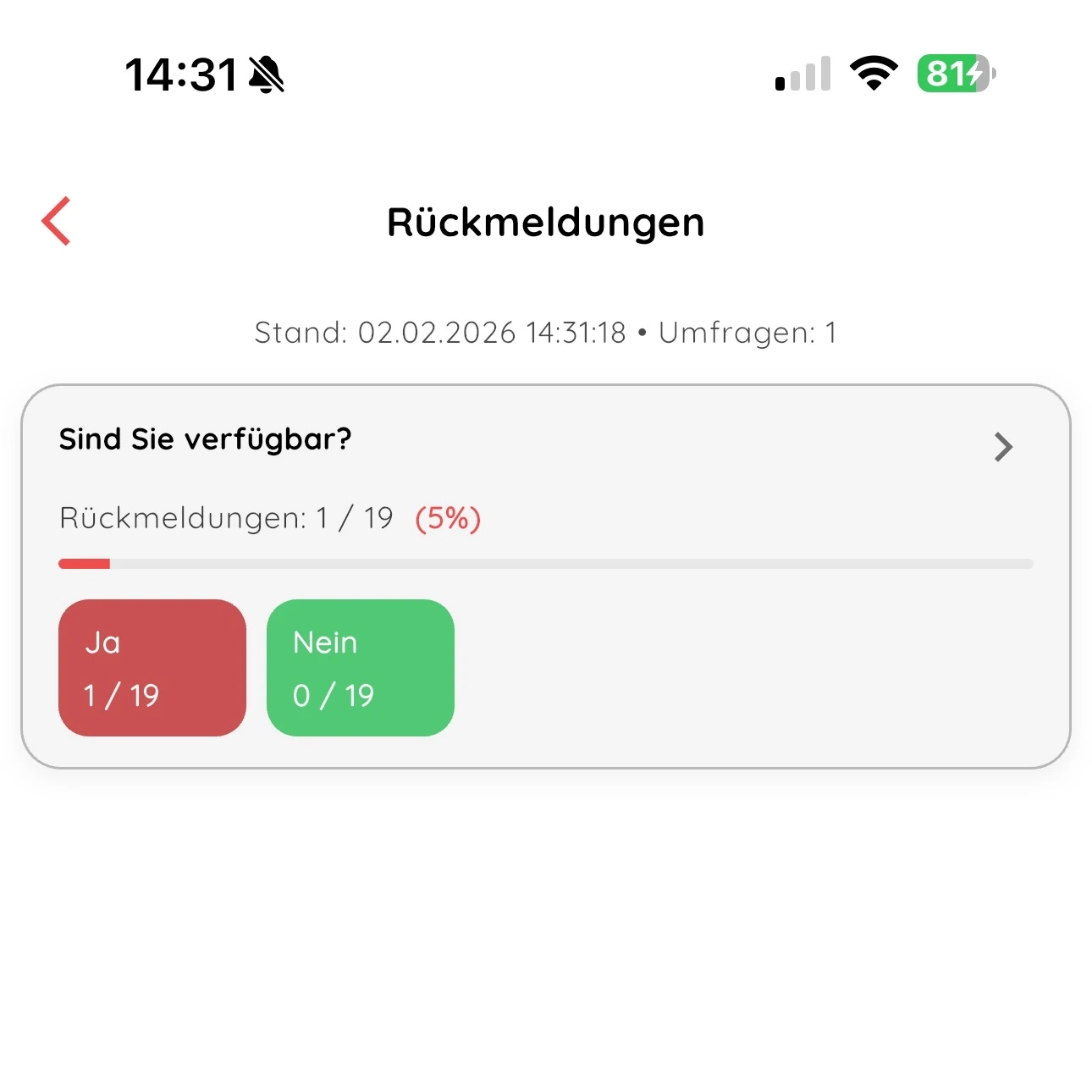
- Live responses — Recipients can acknowledge their status actively with a response. Responses show whether responders are ready. The response function makes it possible to alert more people straight away if needed.
- Traceability — Responses are evaluated live: who has reacted, who is still missing.
- Fewer false alarms and misunderstandings — Predefined scenarios with clear information replace unstructured messages. The context is visible immediately: what has happened, where, and which measures are required.
- Better coordination — Responses are shown live and help with coordination. The incident lead sees at a glance who is coming and when.
Alerting apps enable digital responses that save noticeable time compared with a phone tree.
What makes a modern alerting app
Professional alerting software differs from messenger apps and simple SMS solutions through structured procedures, escalation logic and traceable responses. A chat alone is not enough: without defined scenarios, roles and escalation levels, the commitment needed in emergencies is missing.
Core functions of an alerting app
Alerting through several channels: Alarms can be sent through several channels at once or in stages. Alerting apps can combine different alerting routes to increase reachability.
Predefined scenarios: Fire, IT failure, medical, evacuation; each scenario has its own distribution groups, checklists and incident information.
Response and acknowledgement: Recipients see scenario-specific buttons and can reply with one tap.
Escalation levels: If one level is not enough, the incident lead escalates deliberately to the next — who may do so is defined in advance.
Role and group management: Different recipients depending on scenario, site and duty. Access and permissions can be managed centrally.
Location: The alarm states the place — building, room or workplace.
The NICA Alarm App alerts by push and email; SMS is planned as an extension.
What an alerting app does differently from pagers and phone trees
Pagers use paging networks, are hardware-based and offer one-way communication only. That means: no return channel, no acknowledgement, no record. Modern alerting apps complement the classic analogue pager and replace it in most scenarios.
The concrete differences in everyday use:
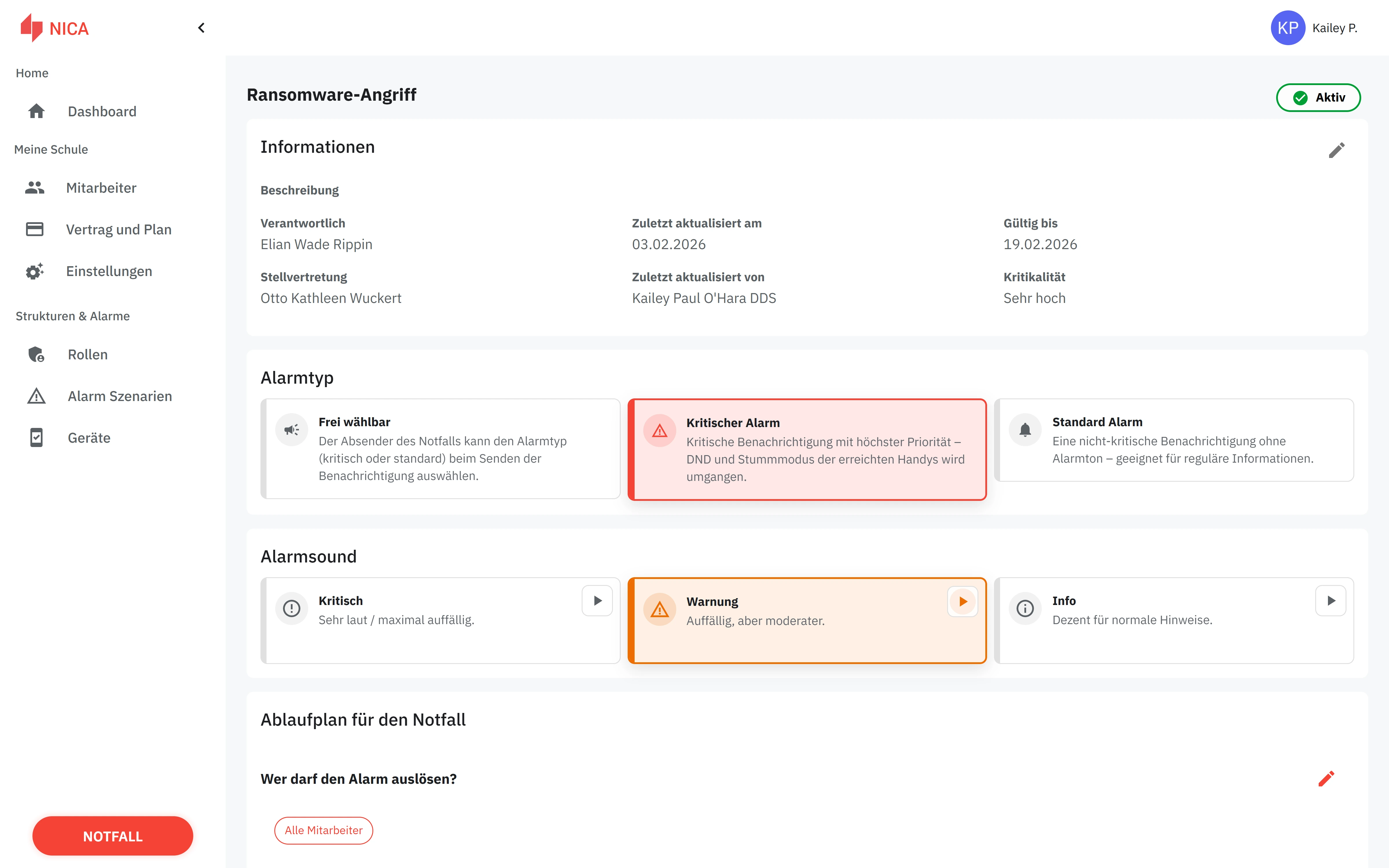
- Distinguishable alarms: Different tones, colours and priorities per scenario instead of a single beep. Alert type and alarm tone can be set per scenario.
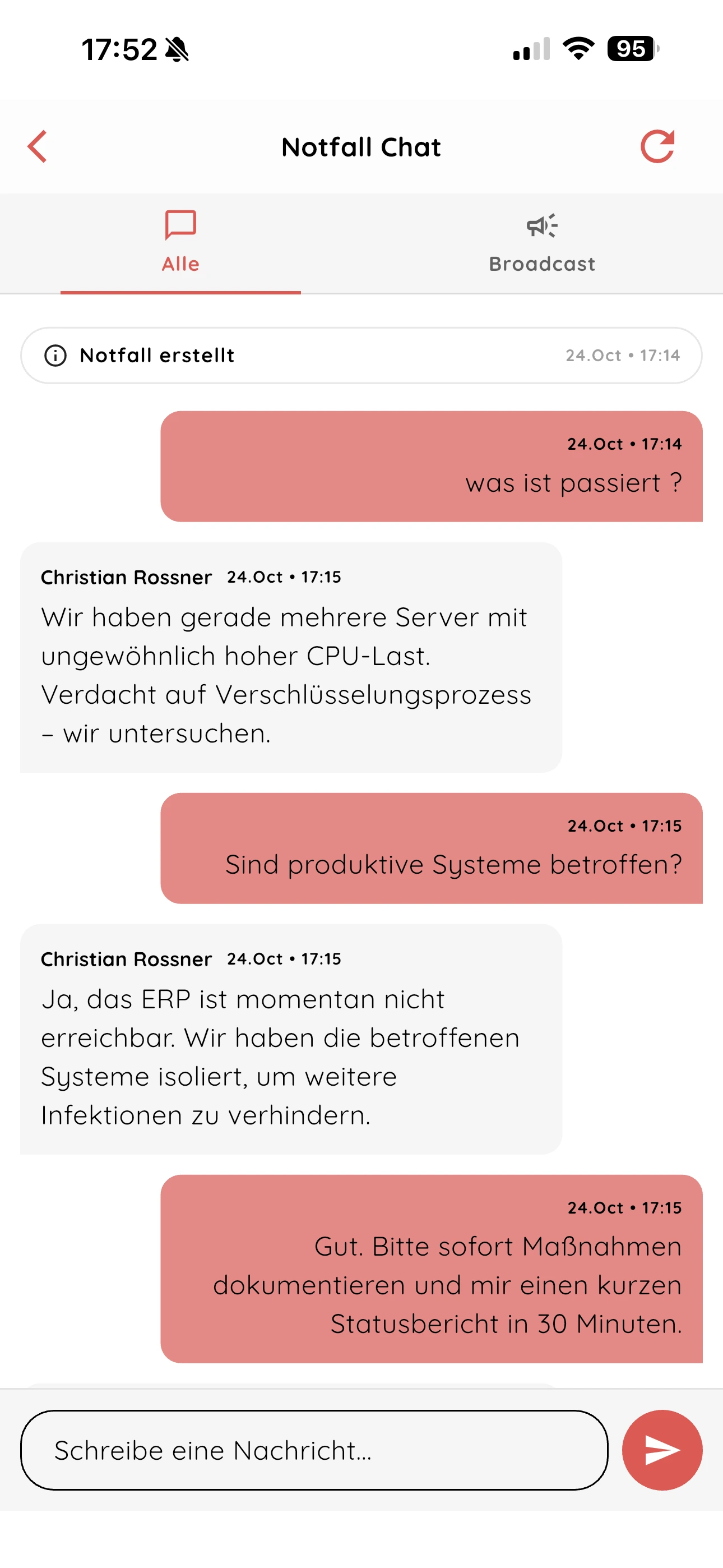
- Two-way communication: Recipients acknowledge, report their availability and use the chat for questions.
- Traceability: Responses are recorded without anyone having to take notes.
On-call IT: a monitoring system detects a server failure and triggers an alarm automatically. The person on duty acknowledges it on the smartphone.
How an alerting app works — step by step
An alert follows five clearly defined steps.
From triggering to a confirmed response
- Trigger the alarm: A person in charge selects the right scenario in the web dashboard or in the app, defines the recipient group and triggers the alarm with one click. Alternatively, an external system (building alarm, IT monitoring, email gateway) triggers the alarm automatically. Alerting is often faster and comes with more context than through conventional routes.
- Distribution and delivery: The push notification is sent to all recipients in parallel. Depending on the solution, email, SMS or phone calls can supplement the delivery. The alarm appears on the device with a tone, the scenario name and relevant details. Alerting apps override silent mode where the smartphone settings allow it.
- Response and overview: Recipients see the incident information and acknowledge with one tap — for example “On my way”, “Delayed” or “Can’t come”; you define the response options yourself. Those in charge see live who has responded and who is still outstanding.
- Escalation: If there is no response or the first level is not enough, the incident lead escalates to the next level; who may escalate is defined in advance.
- Documentation: The responses remain visible for the follow-up review.
Alerting apps in use: typical use cases
Alerting apps enable defined groups of people to be notified quickly, regardless of sector or type of organisation. Requirements differ: a production plant needs fast fault reports to maintenance, a logistics centre the evacuation of whole halls, a school the alerting of all teachers.
Companies and industry
Production plants and logistics centres use alerting apps to reduce downtime. An example: when a machine fails, the control system sends a fault report directly to the maintenance team’s smartphones. The recipients see the affected location, the machine ID and the urgency.
Evacuation alarms reach everyone on site at the same time, including assembly point information. With the email alerting add-on, fault reports from control systems can be turned into NICA Alarm App alarms automatically.
Internal emergency and crisis teams
IT emergency, cyberattack, building failure, bomb threat: emergency teams have to come together within minutes. An alerting app brings the crisis team together and bundles communication in one channel with a chat, instead of spreading information across email, phone and messenger.
Predefined scenarios contain checklists, contact lists and distribution groups. The incident lead sees at a glance who in the team has acknowledged the alarm and who is still missing. Modern alerting apps complement classic alerting systems and create structure where people used to improvise.
Functions to look for in an alerting app
This section is a checklist for decision-makers. The following requirements separate professional solutions from simple notification tools.
Reliable alarm delivery
An alerting app has to get through even when the phone is in silent or do-not-disturb mode. Professional apps such as the NICA Alarm App use operating-system critical alerts for this, which play critical alarms at full volume provided the permission has been granted.
Several channels — such as app and email — increase reachability. Responses show the incident lead who has confirmed the alarm.
Responses and availability
A push-only app is not enough. Without a response, nobody knows whether help is coming. Important functions:
- Availability per alarm: Recipients report with their response whether they are available. The incident lead sees immediately who can be counted on.
- Scenarios with instructions: Everyone sees in the alarm what they need to do now.
- One-tap response: Recipients acknowledge with one tap. The incident lead sees the overview live.
Integration with existing systems
Alarms should not only be triggered by hand but also automatically from existing systems — for example from IT monitoring, a control room or building systems.
The NICA Alarm App can be connected for this by email: data centres, control rooms or monitoring tools trigger an alarm by sending an email to a dedicated alarm address (email alerting add-on).
Data protection and IT security
GDPR compliance is not optional for organisations in German-speaking countries but mandatory. The NICA Alarm App hosts all data in Germany.
Concrete requirements for an alerting app:
- Transparency about where data is processed, and a data processing agreement under the GDPR
- Role and permission concept: not every participant needs access to all information
- Encrypted data transfer and storage
- Regular backups and high availability of the server infrastructure
Organisations should check the provider’s security information before deciding.
The NICA Alarm App as a professional alerting app
The NICA Alarm App is alerting software for companies, schools and organisations. It is not a consumer messenger but a solution for structured emergency communication.
Particular strengths of the NICA Alarm App
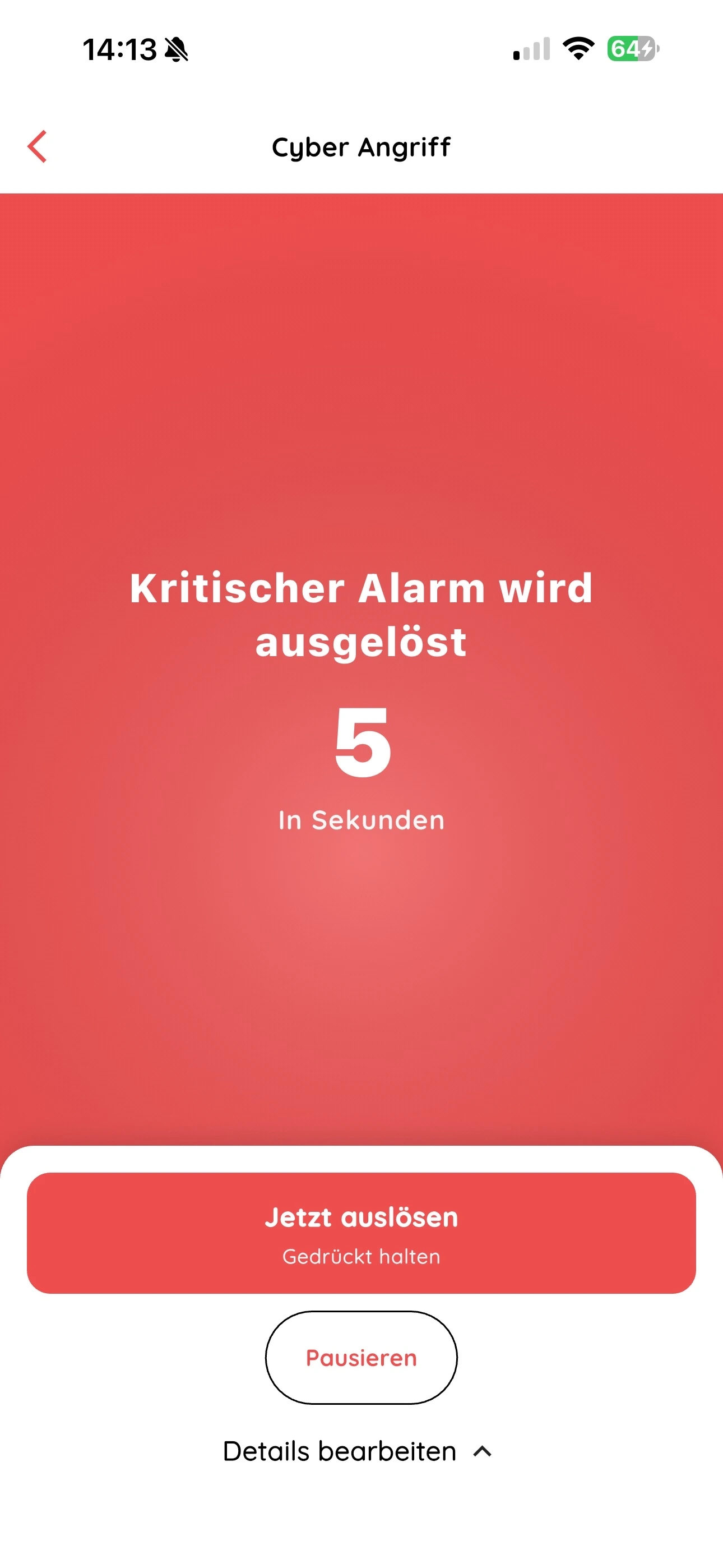
- One-click alerting of predefined scenarios: Trigger an alarm with one click — a short, adjustable countdown prevents false triggers. Recipients don’t have to be put together by hand.
- Flexible grouping: Sites, teams and roles can be combined freely. An alarm can go specifically to a single on-call group or to all sites at the same time.
- Web dashboard and mobile app: Alarms can be triggered from the desktop (web app) or the smartphone (mobile app). Responses, emergency chat and live evaluation are available on both.
- No extra hardware: The app runs on existing smartphones and tablets. iOS (from version 15) and Android (from version 7) are supported.
- Hosting in Germany: All data stays on servers in Germany, in line with the GDPR.
- 14-day free trial: Then from €49 per month net with a 12-month term. The email alerting add-on — triggering alarms by email — costs €228 per year plus VAT.
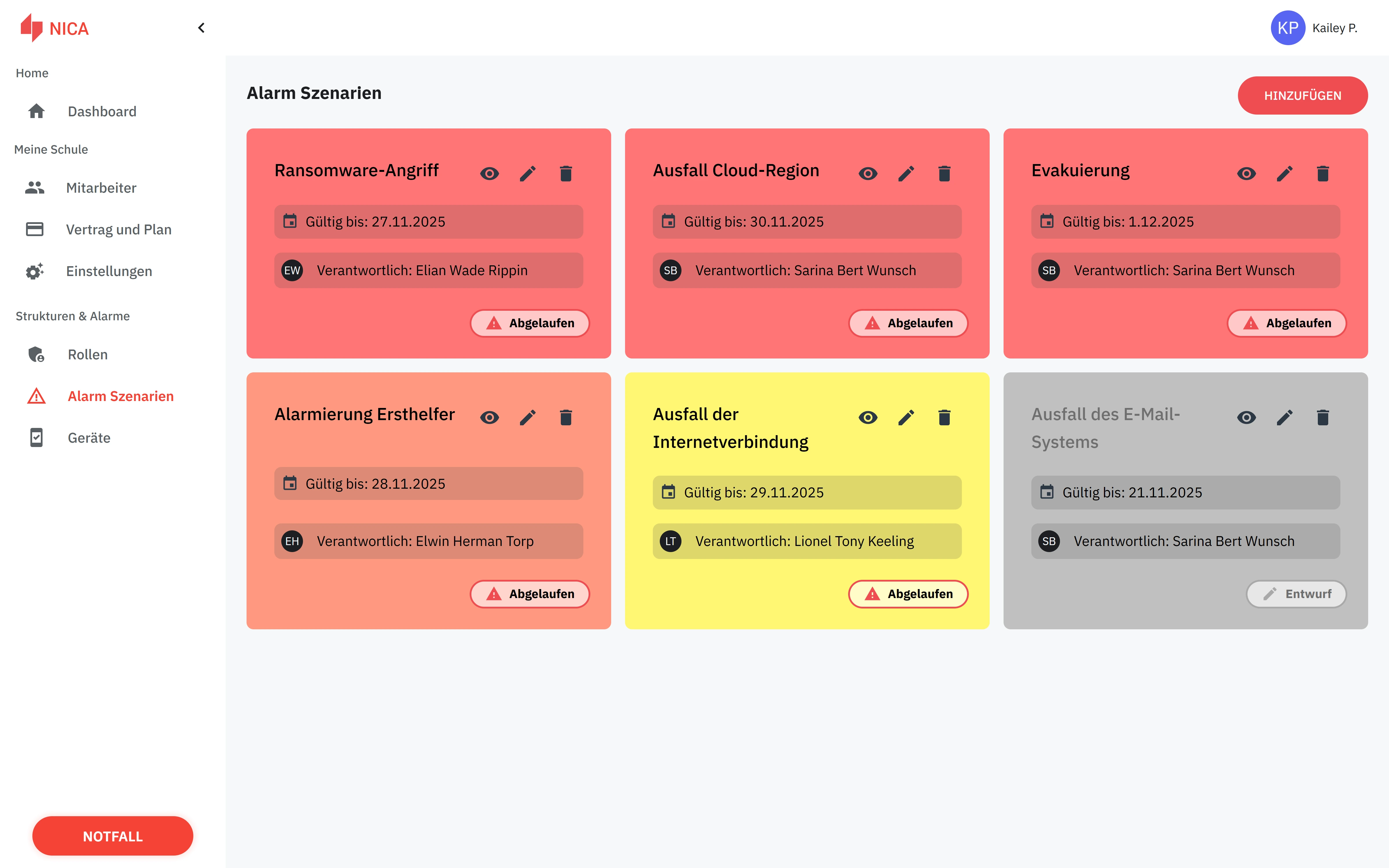
You can find more details on the features on the NICA Alarm App product page.
Which organisations NICA suits particularly well
Mid-sized manufacturers feed fault reports from control systems in by email and alert maintenance teams automatically, so that the right person is informed quickly.
Logistics and public administration use predefined scenarios for building failures, evacuations and security incidents.
Universities and schools alert teachers and staff in the event of a rampage, fire or evacuation — there is a dedicated version for schools.
How to introduce an alerting app in your organisation
Introducing an alerting app can be divided into three steps. The aim is working regular operation within a few weeks.
Step 1: Clarify the requirements
Guiding questions for the assessment:
- Who should be alerted? Define roles, groups and sites. Example: IT on-call, company fire brigade, management crisis team.
- Which scenarios are there? Fire, technical failure, IT outage, medical emergency, evacuation. Each scenario needs its own distribution lists and escalation rules.
- Which channels are mandatory? Push, SMS, phone call, email — depending on network coverage and the recipients’ devices.
Recommendation: play through typical worst-case scenarios (e.g. a server room failure at 2 a.m., a chemical accident in production) and derive requirements for reachability, escalation and documentation from them.
Step 2: Choose and test a solution
Put together a test group: people from incident management, operational responders and IT. Define concrete test cases (night-time IT failure, evacuation drill, change of on-call shift). The NICA Alarm App can be tested free of charge for 14 days.
A pilot means testing real scenarios, evaluating participants’ feedback and adjusting the configuration before rolling out to the whole organisation.
Step 3: Training, rollout and regular operation
A short briefing is usually enough if the app is intuitive to use. Focus of the training: receiving and acknowledging alarms, reporting availability, using the chat.
Establish regular test alarms (e.g. monthly) to build routine and check the delivery rate. Define clear responsibilities: who triggers alarms, who evaluates the records, who maintains the scenarios.
Alerting is most useful when it is embedded in structured emergency management with clear reporting channels and practised procedures.
FAQ on alerting apps
The most frequent questions about alerting apps, answered briefly.
Does an alerting app work when the phone is on silent?
Yes. Professional alerting apps override silent and do-not-disturb mode provided critical alerts are enabled in the device settings. Critical alarms play at full volume with their own tone.
Does every employee need a smartphone?
Not necessarily. Alerting apps can combine different alerting routes: people without a smartphone can be reached by email, for example. The app itself runs on iOS and Android, including tablets.
What happens if there is no internet connection?
Alerting by app needs an internet connection (Wi-Fi or mobile data). For the NICA Alarm App, additional alerting by SMS is planned.
How is personal data protected?
The NICA Alarm App hosts all data in Germany, in line with the GDPR. Data transfer and storage are encrypted. A role and permission concept ensures that only authorised people can access sensitive information.
How quickly can an alerting app be integrated into existing systems?
The NICA Alarm App can be connected by email: data centres, control rooms or monitoring tools trigger an alarm by sending an email to a dedicated alarm address (email alerting add-on). The triggering system only needs this address entered as a recipient.
Which operating systems are supported?
The NICA Alarm App supports iOS (from version 15) and Android (from version 7). A web dashboard is also available for desktop access.
Can alarms be triggered automatically?
Yes. External systems such as monitoring or building systems can trigger alarms — with the NICA Alarm App by email to a dedicated alarm address.
Conclusion: why an alerting app pays off now
Alerting apps enable fast alerting in emergencies, provide live responses and make procedures traceable. Reachability increases because alarms get through even in silent mode.
Check your current alerting processes: how long does it take until all relevant people are informed? How reliable are the responses? If the answers are unsatisfactory, a pilot with a professional solution such as the NICA Alarm App is the next step. Try it free for 14 days, then decide.
Related from our offering
Keep reading
 AI-generated image
Alerting apps in emergencies: the digital lifeline for modern crisis response
Why email, phone chains and messengers fail in an emergency — and how an alerting app significantly cuts response time. With real-world examples.
 AI-generated image
Emergency or crisis? Why the distinction decides your response
Server-room fire at 3 a.m.: emergency or crisis? Separating the two terms cleanly means alerting the right people, escalating in time — and preventing a manageable incident from becoming an existential threat.